Let the model lead.
Show useful financial detail: a workbook, a calculation, a clearly labelled result. Decoration stays secondary.
Finamodel / Brand reference
One place for our identity, interface and the details that make it ours.
A familiar name, an editorial wordmark, a compact financial mark.
 App icon & favicon
.brand-wordmarkAlways spell it Finamodel. Use the actual serif wordmark or supplied light icon asset. Keep the wordmark upright, uncompressed and in one color.
Recommended clear space: at least half the capital letter height on every side. Use ink on light surfaces and warm white on ink.
Show useful financial detail: a workbook, a calculation, a clearly labelled result. Decoration stays secondary.
Warm canvas, white paper, charcoal type and fine borders. Use green and orange with a purpose.
Clear headings, ordinary language and specific actions. Make complex finance easier to read.
Neutrals do most of the work. Green carries the financial detail. Orange adds emphasis.
Core palette · shown in components
backgroundThe warm off-white page background. Give content room to breathe.
Page canvas + card surface
charcoalExact charcoal for primary button fills, dark button labels and button borders.
ui/Button · primary variant
successResults, positive signals, financial detail and selected accents.
CagrWidget · positive result pattern
accent / brandSmall accents and selected caution or negative-result patterns in calculator widgets. Keep large surfaces neutral.
CagrWidget · negative result pattern
Both are 1px wide. The lighter shade separates information; the darker shade makes controls easier to find. They’re supporting interface colors.
#E5E5E5 · a quiet line between things you read.
#CCCCCC · a stronger edge around something you can edit.
These support the four core colors. Excel green is an existing preview detail, not a second Finamodel brand green.
cardCards, inputs and workbook surfaces.
Card and input surface pattern
mutedSecondary buttons, quiet panels and catalog card backgrounds.
ui/Button · secondary variant
Adjust the assumptions to compare scenarios.
muted-foregroundDescriptions, supporting labels and navigation.
ModelCard · supporting description
borderOne-pixel dividers, card edges and table structure.
Table and section divider pattern
inputOutlined buttons and input boundaries.
ui/Button · outline variant
workbook chromeAn existing Excel-preview title bar detail, not a second Finamodel brand green.
TemplateCard · existing preview chrome
=SUM(B4:B12)Cell references inside article code.
code referencesCell references and named ranges in article code examples.
globals.css · blog-code-cell-reference
secondary detailNonessential captions and decorative metadata; use darker ink for small essential text.
Footer · secondary metadata pattern
These are the HEX values used directly in site components. The rounded HSL tokens in globals.css can differ slightly. Use an existing component’s values when extending it.
Serif for the signature. Sans for the interface. Monospace for formulas and technical detail.
The website uses a 14.5px base size. The web app uses 13.75px, with most sizes about 5% smaller than the website. Values below assume the browser’s default 16px root; respect the reader’s font and zoom preferences.
Use the type tokens in each product’s Tailwind configuration. Keep the root font size, spacing, control dimensions and breakpoints unchanged. Standard size tokens retain their existing line heights; custom sizes inherit their context. Smaller text can wrap differently.
The text-xs token remains 12px in both products. Existing smaller editor labels, wordmarks, icon glyphs, chart labels, workbook cell formatting and workbook zoom retain their own sizes. Mobile app and site form text stays at least 1rem; workbook cell inputs keep their own typography.
| Token | Website | Web app |
|---|---|---|
| text-xs | 12 | 12 |
| text-sm | 13 | 12.25 |
| text-base | 14.5 | 13.75 |
| text-lg | 16.5 | 15.75 |
| text-xl | 18 | 17 |
| text-2xl | 22 | 21 |
| text-3xl | 27 | 25.75 |
| text-4xl | 32 | 30.5 |
| text-5xl | 43 | 40.75 |
| text-6xl | 54 | 51.25 |
| text-7xl | 65 | 61.75 |
| text-8xl | 86 | 81.75 |
| text-9xl | 115 | 109.25 |
| text-body-sm | 13.5 | 12.75 |
| text-lead | 15.5 | 14.75 |
| text-article-title | 36 | — |
| text-metric | 24 | — |
| text-title-sm | — | 19 |
A dash means the token belongs only to the other product. The specimens and component examples below use the website scale.
Instrument Serif
400 · normal · 0 trackingHelvetica Neue
32–43 px · 500 · tight tracking · 1.2 line heightHelvetica Neue
22–27 px · 500 · tight trackingHelvetica Neue
14.5–16.5 px · 400 · relaxed line heightHelvetica Neue
12 px · 600 · uppercase · 0.12em trackingCourier New
13 px · 400 · tabular numbersHelvetica Neue → Helvetica → Arial → sans-serif. Use medium-weight headings, relaxed body copy and tight heading tracking.
Instrument Serif is loaded by the site for the wordmark. Keep product headings in the sans family. Courier New is for formulas, filenames and compact data.
Keep navigation, labels and KPI values in sans, with tabular numbers for alignment. Use explicit responsive font sizes rather than viewport-width scaling.
Working examples of the site’s shared UI. The source library below includes every exported component module.
components/ui/Button.tsxSelect a variant to get its code. Heights: 32, 40 and 48px.
<Button variant="primary" size="md">Continue</Button>Change the assumption to update the result.
NumberFieldStarting revenue ($)
NumberInputPill outline · leading icon · 44px height
ScreenerSearchInputValue a business using discounted cash flows.
TemplateCardModel acquisition financing and investor returns.
TemplateCardMuted surfaces turn white on hover. The workbook lifts, the shadow deepens and a green arrow appears.
| USD thousands | 2026 | 2027 | 2028 |
|---|---|---|---|
| Revenue | 1,000 | 1,120 | 1,254 |
| Operating costs | (700) | (762) | (828) |
| EBITDA | 300 | 358 | 426 |
Illustrative data · right-aligned figures · units in the header
widgets/BenchmarkChart.tsxA small corner radius, a quiet surface, clear hierarchy and useful model detail. Save full pill corners for actions, search and small labels.
Independent disclosures. Open several answers to compare them.
components/CompanyFAQ.tsxOne answer at a time, with a plus/minus control. Used on calculator pages.
tools/BusinessMetricCalculatorParts.tsx → FaqSectionA fading preview with working “Read more” and “Show less” controls.
A useful overview explains what the model covers, the assumptions someone can change and the outputs they can review. Start with the purpose before introducing individual worksheets.
Group revenue, costs and timing into clearly labelled inputs. Include the units and period beside each value so the next person can understand the model without reconstructing its logic.
Show the scenario behind each result. Use consistent number formats, right-aligned figures and short explanations of the calculation. Identify illustrative figures so they cannot be mistaken for company data.
Expandable content keeps longer explanations available without making the initial view overwhelming. Use it for background and methodology; keep essential assumptions and actions visible from the start.
components/ReadMoreSection.tsxNext-year revenue
$1.12m
$1m starting revenue, growing 12%.
Operating profit
$336k
Illustrative 30% operating margin.
Revenue growth
12.0%
The assumption used in this example.
tools/BusinessMetricCalculatorParts.tsx → ResultCardMonospace is reserved for the calculation; labels and results stay sans.
tools/BusinessMetricCalculatorParts.tsx → FormulaBlockThe shared author block used on articles and calculators, including its original links.

Founder of Finamodel • Professional Financial Modeller • Ex-Deloitte
components/ArticleAuthorBio.tsxThe icons currently used across the site, including the custom funding-stage pieces. Select one to copy its JSX or download an SVG.
Pair icons with clear labels. Give icon-only buttons an accessible name; mark decorative icons aria-hidden. Keep colors tied to meaning.
Fine grids, real workbook detail, generous spacing and small movements.
hero-dot-pattern1px dots / 24px grid
BackgroundGrid1px lines / 40px grid
4812162432486416–24px page gutters · 24–32px card padding · 48–80px section spacing
Common content widths are 1000px and 1200px. Keep 1px borders subtle. Use tiny card corners and fully rounded buttons; preserve component-specific radii.
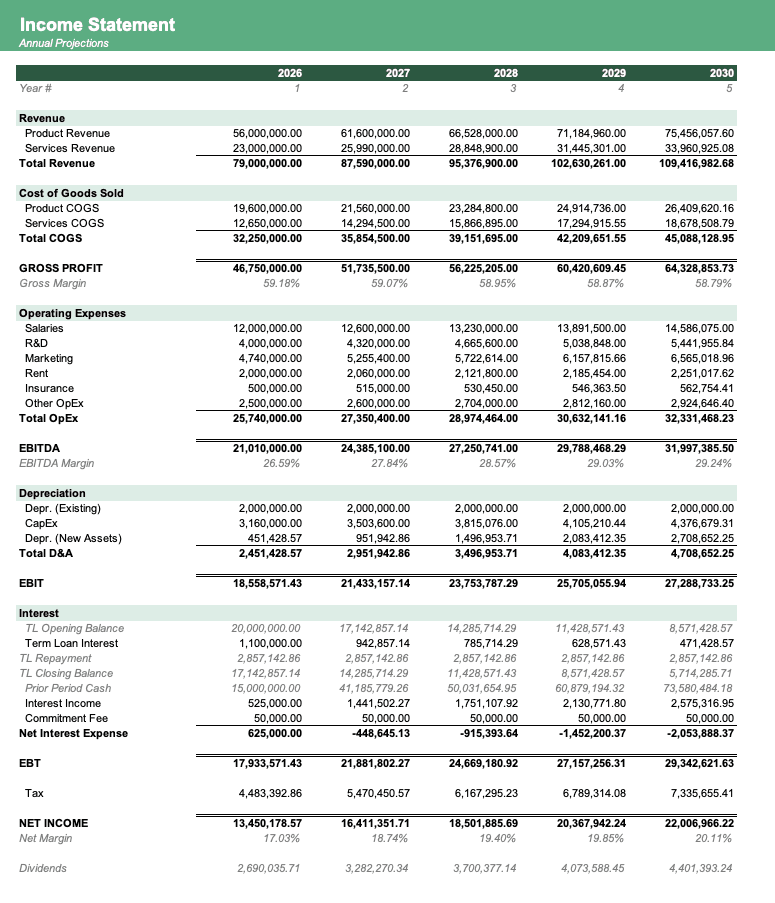
Use real sheet detail, green title bars, restrained window controls and overlapping paper surfaces. Keep text and numbers legible at the intended size.
/recolor/green.pngSmall movement. Clear feedback.
Entrances: 600ms, ease-out, 16px upward. Catalog hover: 300ms; workbook movement: 500ms. Pause or remove decorative movement for reduced-motion preferences.
Explore Fina's expressionsA charcoal square and two bright eyes connect Finamodel with Finawork. Keep the same proportions at every size, with a clear label beside compact appearances.
The silhouette and eyes carry recognition. Pair with a short label for status or actions; keep movement restrained.
Give Fina more room in introductions and guidance. Preserve the charcoal fill, white eyes and original geometry.
Direct, useful and specific. Write like someone who knows the model and respects the reader’s time.
Download Excel template
Unlock your financial potential
Change the assumptions to compare scenarios.
Supercharge your strategic decision-making.
Revenue grows 12% in this example.
Unprecedented, industry-leading growth.
Find the existing implementation before building another one. Search by component name, path or exported symbol.
components/Analytics.tsxExports: Analytics
components/AppLink.tsxExports: AppLink
components/AppPreviewStack.tsxExports: AppPreviewProofPoints, AppPreviewStack
components/ArticleAuthorBio.tsxExports: ArticleAuthorBio
components/AuthorBio.tsxExports: AuthorBio
components/widgets/BenchmarkChart.tsxExports: BenchmarkChart
components/blog/BlogIndex.tsxExports: BlogIndex
components/blog/BlogPost.tsxExports: BlogPost
components/BrandRecolorSection.tsxExports: BrandRecolorSection
components/tools/BreakEvenCalculator.tsxExports: BreakEvenCalculator
components/widgets/BreakEvenWidget.tsxExports: BreakEvenWidget
components/tools/BusinessMetricCalculatorParts.tsxExports: NumberField, CalculatorHero, ResultCard, FormulaBlock, FaqSection, ToolAuthorBio
components/ui/Button.tsxExports: Button
components/tools/CagrCalculator.tsxExports: CagrCalculator
components/widgets/CagrWidget.tsxExports: CagrWidget
components/CategoriesBrowser.tsxExports: CategoriesBrowser
components/ChunkLoadRecovery.tsxExports: ChunkLoadRecovery
components/tools/ChurnRateCalculator.tsxExports: ChurnRateCalculator
components/CompanyCTA.tsxExports: CompanyCTA
components/CompanyFAQ.tsxExports: CompanyFAQ
components/tools/CompanyForecastCalculator.tsxExports: CompanyForecastCalculator
components/widgets/CompanyForecastWidget.tsxExports: CompanyForecastWidget
components/CompanyList.tsxExports: CompanyList
components/CompanyListView.tsxExports: CompanyListView
components/CompanyLogo.tsxExports: CompanyLogo
components/CompanyPreviewRail.tsxExports: CompanyPreviewRail
components/CompanyScreener.tsxExports: CompanyScreener
components/CompanySectorGrid.tsxExports: CompanySectorGrid
components/tools/CompoundInterestCalculator.tsxExports: CompoundInterestCalculator
components/widgets/CompoundInterestWidget.tsxExports: CompoundInterestWidget
components/ui/CookieBanner.tsxExports: CookieBanner
components/CopilotCTA.tsxExports: CopilotCTA
components/CopilotLink.tsxExports: CopilotLink
components/CopilotPromptForm.tsxExports: CopilotPromptForm
components/tools/DcfCalculator.tsxExports: DcfCalculator
components/tools/DebtCapacityCalculator.tsxExports: DebtCapacityCalculator
components/DesignDocSections.tsxExports: DesignDocSections
components/DownloadButton.tsxExports: DownloadButton
components/tools/DscrCalculator.tsxExports: DscrCalculator
components/widgets/DscrWidget.tsxExports: DscrWidget
components/EmbedWorkbook.tsxExports: EmbedWorkbook
components/tools/EquityDilutionCalculator.tsxExports: EquityDilutionCalculator
components/tools/EvEbitdaCalculator.tsxExports: EvEbitdaCalculator
components/ExcelChartOverlay.tsxExports: ExcelChartOverlay
components/ExcelPreview.tsxExports: ExcelPreview
components/faq/FaqCategoryArticle.tsxExports: FaqCategoryArticle
components/FaqContactLink.tsxExports: FaqContactLink
components/faq/FaqIndex.tsxExports: FaqIndex
components/faq/FaqSearch.tsxExports: FaqSearch
components/FeaturedLibrarySection.tsxExports: FeaturedLibrarySection
components/Footer.tsxExports: Footer
components/tools/FounderSalaryCalculator.tsxExports: FounderSalaryCalculator
components/icons/FundingIcons.tsxExports: ChessKnight, ChessQueen
components/FundingRoundScatter.tsxExports: FundingRoundScatter
components/FundingRoundScroller.tsxExports: FundingRoundScroller
components/tools/GuidedModelTool.tsxExports: GuidedModelTool
components/HistoricalFinancialsTabs.tsxExports: HistoricalFinancialsTabs
components/tools/IrrCalculator.tsxExports: IrrCalculator
components/widgets/IrrWidget.tsxExports: IrrWidget
components/tools/LoanAmortizationCalculator.tsxExports: LoanAmortizationCalculator
components/widgets/LoanAmortizationWidget.tsxExports: LoanAmortizationWidget
components/tools/LtvCacCalculator.tsxExports: LtvCacCalculator
components/tools/MarketingRoiRoasCalculator.tsxExports: MarketingRoiRoasCalculator
components/tools/MarketShareGrowthCalculator.tsxExports: MarketShareGrowthCalculator
components/ModelCard.tsxExports: ModelCard
components/ModelIntegritySection.tsxExports: ModelIntegritySection
components/ModelShareButton.tsxExports: ModelShareButton
components/tools/MrrArrCalculator.tsxExports: MrrArrCalculator
components/Navbar.tsxExports: Navbar
components/tools/NpvCalculator.tsxExports: NpvCalculator
components/widgets/NpvWidget.tsxExports: NpvWidget
components/widgets/NumberInput.tsxExports: NumberInput
components/tools/PaybackPeriodCalculator.tsxExports: PaybackPeriodCalculator
components/widgets/PaybackPeriodWidget.tsxExports: PaybackPeriodWidget
components/Pricing.tsxExports: Pricing
components/legal/Privacy.tsxExports: Privacy
components/tools/ProfitMarginCalculator.tsxExports: ProfitMarginCalculator
components/widgets/ProfitMarginWidget.tsxExports: ProfitMarginWidget
components/ReadMoreSection.tsxExports: ReadMoreSection
components/RecolorStack.tsxExports: RecolorStack
components/legal/Refunds.tsxExports: Refunds
components/tools/RelatedToolCtas.tsxExports: RelatedToolCtas
components/tools/RevenueGrowthRateCalculator.tsxExports: RevenueGrowthRateCalculator
components/tools/RoiCalculator.tsxExports: RoiCalculator
components/widgets/RoiWidget.tsxExports: RoiWidget
components/tools/RuleOf72Calculator.tsxExports: RuleOf72Calculator
components/widgets/RuleOf72Widget.tsxExports: RuleOf72Widget
components/RunwayCalculator.tsxExports: RunwayCalculator
components/tools/SalesFunnelConversionCalculator.tsxExports: SalesFunnelConversionCalculator
components/SchedulePreviewSwitcher.tsxExports: SchedulePreviewSwitcher
components/SchedulesDirectory.tsxExports: SchedulesDirectory
components/ScreenerSearchInput.tsxExports: ScreenerSearchInput
components/SearchBrowser.tsxExports: SearchBrowser
components/legal/Security.tsxExports: Security
components/SeoJsonLd.tsxExports: SeoJsonLd
components/SiteShell.tsxExports: SiteShell
components/SocialProofLogos.tsxExports: SocialProofLogos
components/StartupCategoryGrid.tsxExports: StartupCategoryGrid
components/StartupFundingRoundGrid.tsxExports: StartupFundingRoundGrid
components/StartupFundingRoundScatter.tsxExports: StartupFundingRoundScatter
components/StartupListView.tsxExports: StartupListView
components/StartupModelsIndex.tsxExports: StartupModelsIndex
components/tools/StartupRunwayCalculator.tsxExports: StartupRunwayCalculator
components/widgets/StartupRunwayWidget.tsxExports: StartupRunwayWidget
components/StartupScreener.tsxExports: StartupScreener
components/StickyTemplateCta.tsxExports: StickyTemplateCta
components/StoreHome.tsxExports: StoreHome
components/tools/TamSamSomCalculator.tsxExports: TamSamSomCalculator
components/TeamCredentialLink.tsxExports: TeamCredentialLink
components/TeamSection.tsxExports: TeamSection
components/TemplateAppLink.tsxExports: TemplateAppLink
components/TemplateCard.tsxExports: TemplateCard
components/TemplatesBrowser.tsxExports: TemplatesBrowser
components/tools/TerminalValueCalculator.tsxExports: TerminalValueCalculator
components/legal/Terms.tsxExports: Terms
components/TiltCard.tsxExports: TiltCard
components/TimeSavingsCalculator.tsxExports: TimeSavingsCalculator
components/tools/ToolsIndex.tsxExports: ToolsIndex
components/TradingViewWidget.tsxExports: TradingViewWidget
components/Turnstile.tsxExports: Turnstile
components/tools/UserCohortRetentionCalculator.tsxExports: UserCohortRetentionCalculator
components/tools/WaccCalculator.tsxExports: WaccCalculator
components/widgets/WaccWidget.tsxExports: WaccWidget
components/tools/WorkingCapitalCalculator.tsxExports: WorkingCapitalCalculator
components/widgets/WorkingCapitalWidget.tsxExports: WorkingCapitalWidget
Inventory generated from the site’s component exports. Refresh after additions with npx tsx scripts/generate-brand-library.ts. Page-specific modules are included for reference; inspect their props before reuse.
Original files and portable references for the next Finamodel page.




app/globals.css · tailwind.config.ts · app/layout.tsx · components/ui/Button.tsx
This guide documents the current site and recommended usage. The original component files own their behavior and styling.
Go further
Browse templates, examples, and downloadable Excel models for the analysis you are trying to build. If you can't find your model, ask Fina to build a model for your specific needs.
Start for free